For years, many businesses have treated Google performance as a fairly simple equation: better rankings lead to more traffic, which leads to more enquiries, sales or revenue. That relationship still matters, but it is becoming less direct. Search results are changing, AI is influencing how people discover and evaluate businesses, and visibility does not always result in a click.
Brand recognition, demand and the wider customer journey therefore matter more than traffic alone. Even so, organic traffic remains an important measure for many businesses. If yours has fallen, the following seven checks can help you work out what has actually changed before you decide what to do next.
1. First, make sure traffic has actually dropped
For companies that rely on their website to generate leads or sales, organic traffic can quickly become one of the most closely watched performance measures. When that happens, it is easy to become focused on daily changes in traffic and to read too much into short term fluctuations.
A few weaker days can quickly create the impression that Google visibility has fallen dramatically, even when the underlying picture has changed very little. Before assuming there is a serious SEO problem, the first step is to establish whether the decline is real, significant and actually connected to Google Search.
The first question is not simply whether traffic is down, but what has actually dropped.
Start by comparing the same date range in GA4 and Google Search Console. Avoid drawing conclusions from a single day or a handful of weaker days. Look for a pattern across a meaningful period rather than reacting to normal daily movement.
GA4 tells you about sessions and user activity recorded on the website, while Google Search Console shows how your website is performing within Google Search through metrics such as impressions and clicks. These measures can move differently, so they should not be treated as interchangeable versions of the same number.
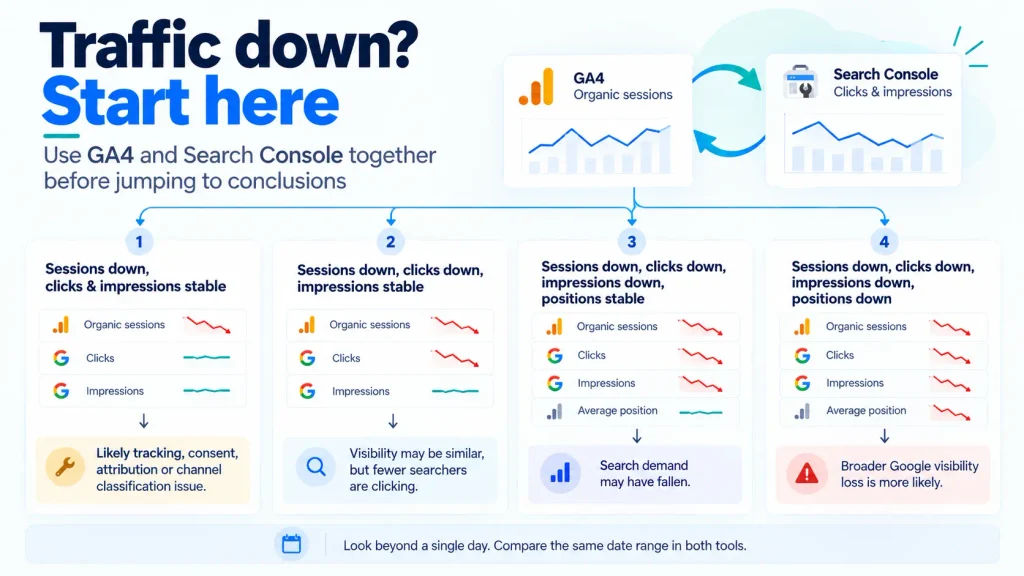
If GA4 organic sessions have fallen but Search Console clicks and impressions remain broadly stable, you do not yet have strong evidence that your visibility in Google Search has declined. The difference may instead relate to tracking, consent, attribution or the way traffic is being classified.
If Search Console clicks and impressions have also declined across the same period, there is a clearer indication that something has changed in Google Search performance and is worth investigating further.
At this stage, the goal is not to diagnose the cause. It is simply to establish whether there is a genuine search performance issue before you start looking at rankings, Google updates or technical problems.
2. Look at impressions as well as clicks
Start with GA4 organic sessions, then compare what Search Console is showing for clicks and impressions over the same period. Looking at both systems side by side makes it easier to see whether the change points to Google Search performance or to measurement and attribution.
| GA4 metric | Search Console metric | What it may mean | What to check next |
|---|---|---|---|
| Organic sessions down | Clicks and impressions broadly stable | No strong evidence yet of a Google Search visibility loss | Investigate tracking, consent, attribution and channel classification |
| Organic sessions down | Clicks down, impressions broadly stable | Visibility may be similar, but fewer searchers are clicking | Check query and page positions, search result appearance and query mix |
| Organic sessions down | Clicks down, impressions down, relevant query or page positions broadly stable | Search demand may have fallen | Check queries, pages and country |
| Organic sessions down | Clicks down, impressions down, relevant query or page positions down | A broader loss of Google visibility is more likely | Investigate rankings, affected pages, Google updates and technical issues |
| Organic sessions broadly stable | Impressions down, relevant query or page positions broadly stable | Search demand may be falling, but GA4 totals may be supported by other organic sources or stronger click through | Check Google query trends, search demand and source medium in GA4 |
| Organic sessions broadly stable | Overall clicks stable, but clicks down for important pages or queries | Aggregate traffic can hide a decline in commercially important search visibility | Compare key landing pages and queries rather than relying on totals |
Position here means the average position of the relevant queries or pages you are investigating, not the sitewide average position figure. Small ranking movements may affect clicks without causing a similar fall in impressions. If impressions drop sharply while those query or page positions remain broadly similar, lower search demand may be a factor. Compare the same country before drawing conclusions.
3. Compare like with like, but like for like is changing
When comparing traffic levels, it is easy to fall into the trap of looking at the most recent period against the one immediately before it. GA4 and Google Search Console make these comparisons convenient, but they do not always provide a fair basis for judging whether search performance has actually changed.
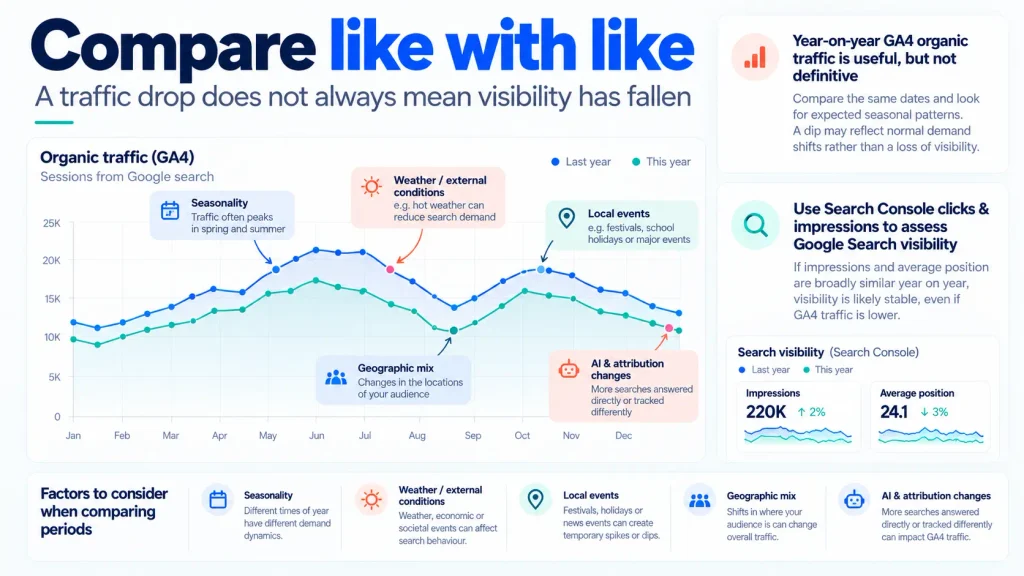
One of the main reasons is that search demand is not constant. The number of people searching for a product or service can rise or fall for reasons that have nothing to do with your rankings or SEO performance.
- Seasonality: A landscaping business may naturally attract more searches during spring and summer, while an accountancy firm may see stronger demand around key tax deadlines.
- Weather and external conditions: Unusually warm, cold or wet weather can quickly change demand for services such as landscaping, heating, roofing, hospitality or leisure.
- Local or wider events: Strikes, transport disruption, school holidays, major events or other changes in local circumstances can temporarily influence what people search for and when.
- Geographic changes: Overall traffic can be distorted by increases or declines from countries outside your target market. If your business primarily serves Ireland, compare Irish traffic and Search Console performance separately before concluding that visibility has fallen.
This is why a fall in traffic does not automatically mean that visibility has fallen. In some cases, your rankings may be broadly unchanged while fewer people are searching in the first place.
A year on year organic comparison may not be like for like
Even year on year comparisons need context. “Organic traffic” and digital attribution are being redefined, so comparing this year’s organic sessions with last year’s does not automatically mean you are measuring exactly the same thing, even if the GA4 channel label is identical.
- Google Analytics now separates recognised AI assistant referrals into its own AI Assistant channel. That can change the channel mix compared with earlier periods, when some of this activity could have appeared elsewhere.
- AI can influence a visit without receiving the credit. Someone may discover a business in ChatGPT or another assistant, then Google the brand and arrive via organic search, or type the URL directly. GA4 records the final visit source, not necessarily the discovery source.
- Consent settings, ad blockers, tagging changes and analytics implementation can also change how sessions are recorded without any equivalent change in Google Search visibility.
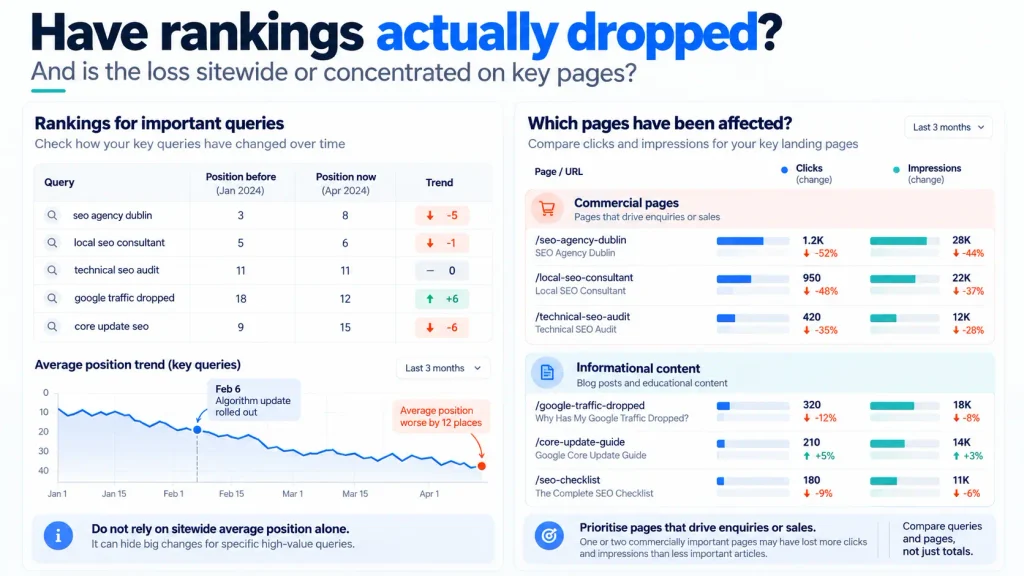
4. Check whether you have actually lost rankings
Once you have confirmed that the decline is real and that you are comparing like with like, the next step is to see whether your rankings have actually changed. Do not focus on a movement of one or two positions in isolation. Look for a sustained decline across queries that matter to the business.
Start with Google Search Console. In the Performance report, compare the same periods you have already been reviewing, then look at position at query and page level to see whether important searches or landing pages have moved. Do not use the sitewide average position figure as a KPI, because it can hide very different movements across the queries and pages that matter. Apply the same country and device filters where relevant so the comparison is consistent.
Where organic search is important to the business, it is worth setting up a dedicated rank tracking tool for a defined set of important keywords. Semrush Position Tracking can record rankings automatically over time, giving you a historical record to compare when traffic changes. Collecting this data regularly is useful, but avoid reacting to normal day to day movement. Look for sustained changes and broader patterns instead.
If you want a second opinion, free tools such as Ahrefs Keyword Rank Checker can show where a page ranks for a particular search in a selected country. For businesses where location matters, BrightLocal’s Local Search Results Checker can show results from a chosen location. These are useful for spot checks, but Search Console should remain your main source for understanding how your own visibility has changed over time.
You can also check a few important searches manually. Use a private or incognito window, sign out of Google, select the correct country or location where possible and check the same device type you are investigating. Treat this only as a sense check. Search results can vary by location, device and the type of results Google displays, so a manual search is not a reliable substitute for historical Search Console data.
5. Find out whether the whole website dropped or just one page
Not all traffic losses are equally important. A decline in impressions and clicks to a page that generates enquiries or sales can have a much greater impact on the business than a similar decline to an informational article.
Before deciding what action to take, it is important to understand where the loss has occurred and what type of traffic has been affected. Losing visibility for commercially important pages may require a very different response from losing traffic to content that plays a less direct role in generating business.
Start in Google Search Console and look at performance by page. This will help you establish whether the decline is affecting the whole website, a particular group of pages or one previously strong page. You can then use GA4 to understand what those affected pages contribute in terms of organic sessions, enquiries, sales or other conversions.
If the decline is concentrated on commercially important pages, prioritise those first. If it is broader, continue investigating the site as a whole.
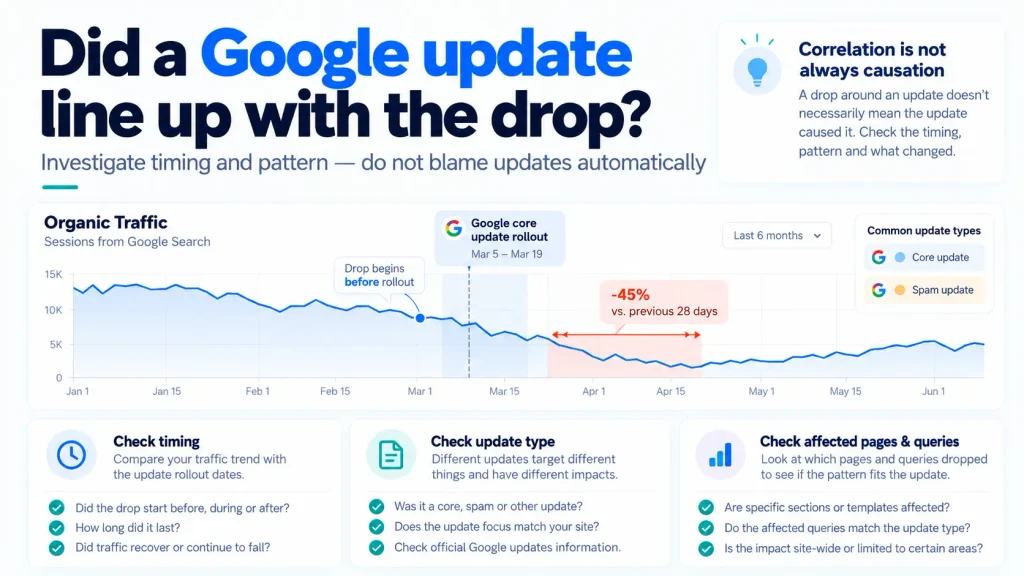
6. Check whether Google has released an update
Google regularly updates the systems it uses to rank and prioritise content in Google Search. Some changes are broad, such as core updates, while others are more specific, such as spam updates.
These updates can affect a website’s visibility, but the impact is not always negative. Some sites may lose visibility, some may gain it and many may see little meaningful change. The important thing is to establish whether an update was taking place, what type of update it was and whether it genuinely lines up with the decline you are seeing.
- Check the Google Search Status Dashboard to see whether a ranking update was taking place around the time the decline began.
- Identify what type of update it was, because a core update and a spam update are not the same thing.
- Compare the timing carefully. If the decline started well before the update, the update is unlikely to explain the initial drop.
- Look at the pattern of the decline. Check which pages and queries were affected rather than assuming the whole website moved because of the update.
A Google update is therefore something to investigate, not something to blame automatically. If the timing and pattern do not fit, keep looking for another explanation. Even when an update does line up with the decline, avoid chasing individual updates or letting short term volatility dictate your wider SEO strategy. Focus on the longer term pattern, the underlying causes and the long term health of the site instead.
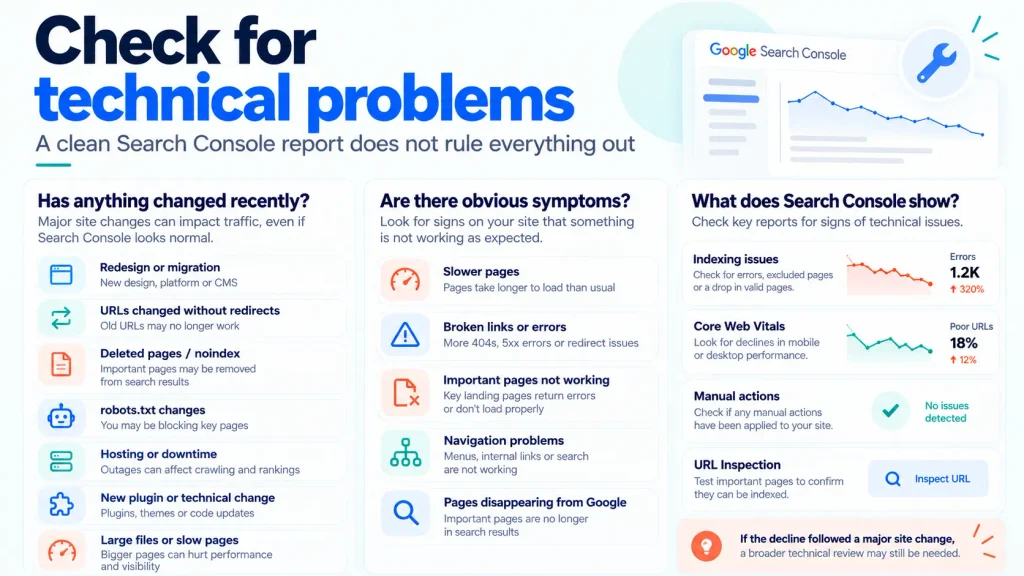
7. Check for technical problems
Technical problems can affect search performance even when Google Search Console does not flag an obvious issue. Start by asking three simple questions.
Has anything changed recently?
Think about anything that happened shortly before the decline, such as:
- A redesign or website migration.
- URLs changing without redirects.
- Pages being deleted or accidentally set to noindex.
- Changes to robots.txt.
- Hosting, server or downtime issues.
- A new plugin or other technical change.
- Large images, files or other changes that may have affected page speed.
Are there obvious technical symptoms?
You do not need specialist tools to spot every warning sign. Look for things such as:
- Pages loading much more slowly than usual.
- Broken links or pages returning errors.
- Important pages no longer working properly.
- Navigation or other parts of the website behaving incorrectly.
- Important pages disappearing from Google Search.
What does Google Search Console show?
Use Search Console to check whether Google is reporting indexing problems, Core Web Vitals issues, manual actions or problems with important URLs. The URL Inspection tool can also help confirm whether a key page is indexed and eligible to appear in Google Search.
Search Console is useful, but a clean report does not rule out every technical problem. If the decline followed a significant website change, or you are seeing obvious issues with speed, links or page behaviour, a broader technical review may still be needed.
What NOT to do when your traffic drops
- Do not immediately rewrite the entire website.
- Do not delete pages simply because traffic has fallen.
- Do not assume you have received a Google penalty.
- Do not make ten major changes at once – you will not know which change helped or hurt.
When should you actually be concerned?
- The decline has persisted beyond a known Google update or other period of expected volatility.
- Important service or product pages have lost impressions, clicks or rankings.
- The decline began immediately after a website migration, redesign or other major technical change.
- The traffic decline is also affecting enquiries, sales or other meaningful conversions.
If your Google traffic or rankings have dropped and the cause is not obvious, avoid making changes blindly. SWOT Digital can review what changed, identify the likely cause and recommend the right next steps.
Request a free SEO traffic drop assessment.